Knowledge
How booking and management software helps small businesses.
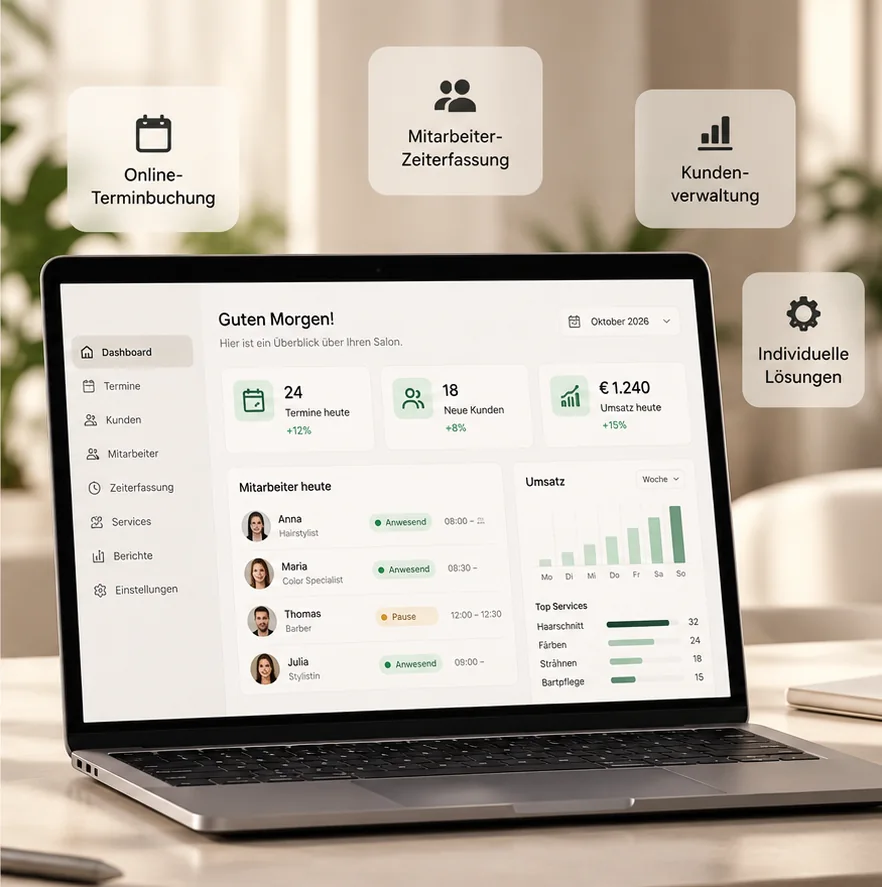
Appointments by phone, jobs on paper slips, customers in a spreadsheet: that is how everyday work looks in many small businesses. This article shows what booking and management software can take over, when standard software is enough and when a custom web app pays off for your business.
In short
A good solution brings booking, calendar, customer data, jobs and invoices into one place. Customers book themselves, the team sees the same information, and double bookings are caught before they happen. What matters is that the software fits your workflow, not the other way round.
Where small businesses lose time every day
Many businesses organise themselves with whatever is at hand: phone, messages, notebook, spreadsheets. That works while things are quiet. With more customers, typical problems appear: appointments are double-booked, follow-up questions cost time, and nobody has an overview of what is open.
It is especially annoying that the same information is often maintained several times: in the calendar, in the customer list, on the job slip and later again in the invoice.
What good booking and management software does
A suitable solution takes routine work off your hands. The most important building blocks:
Online appointment booking
Customers choose the service and a free time themselves, even outside opening hours. Good systems take working hours, holidays and closures, buffer times and the availability of individual employees into account, so only truly free times are offered.
A calendar that prevents double bookings
All appointments come together in one calendar. Overlaps are detected before an appointment is saved, and moving or cancelling is quick.
Customers and jobs in one place
Contacts, appointment history, requests and jobs are linked. Whoever calls is found right away with their history instead of being searched for across different lists.
Employees, resources and permissions
The team has its own logins. Not everyone needs to see everything: access rights and privacy can be set so that, for example, financial data is visible to management only.
Waiting list, quote and invoice
When an appointment becomes free, a waiting list helps fill it. Requests can be carried on to quotes, jobs and invoices without retyping data.
Overview and reporting
An overview shows what is due today and how appointments, revenue and open items develop, as a basis for decisions instead of gut feeling.
Everyday examples
These are example scenarios, not client reports:
A hair salon lets clients book online and sees the workload per employee in the calendar. A car workshop accepts appointment requests for inspection or repair and keeps jobs and status in view. A small studio manages customers, services and appointments with separate logins for team and management.
Standard software or a custom solution?
Standard software is quick to set up and often sufficient for typical workflows. It reaches its limits when your workflow deviates from the norm, when several programs do not work together, or when you pay for features you do not use.
A custom solution is built around your workflows: appointment booking, customer management, time tracking, orders and reporting in one system. It needs planning and a budget, but fits your business exactly and can grow with you.
When a custom web app pays off
Custom development makes sense if at least one of these points applies to you. We will tell you honestly whether standard software is enough or a web app makes sense: both have their place.
- Your workflows cannot be mapped cleanly in any standard program.
- You use several tools and copy data between them by hand.
- Customers should book online, and the system should match your brand and your rules.
- Employees need their own logins, for example for time tracking or scheduling.
- You want key figures on orders, revenue and workload in one place.
How a project with Labrity works
In the first conversation you describe your workflow. We clarify scope, roles and features, prepare a personal quote, build the application in agreement with you and go live together. We only name a fixed price once the scope is clear.
What to watch for regarding data protection and hosting
As soon as customer data is stored, GDPR matters: which data is collected, where is it stored, who has access? Ask every provider about this, including us. This article does not replace legal advice.
Questions before you decide
These points help you choose between standard software and a custom solution:
- Which workflows should really be made easier?
- Who on the team needs which access?
- Does the solution need to be integrated into your existing website?
- Which data is stored and where?
- Who looks after the solution after launch?
Frequently asked questions
What businesses often want to know.
Does a small business need booking software at all?
If appointments currently run by phone and notes and there are few of them, that can be enough. With several employees, many requests or double bookings, a solution is worthwhile.
Can online booking be integrated into my existing website?
Often yes, for example as a button or a separate area. What fits technically we clarify after looking at your website.
How does developing a custom solution work?
First we clarify your workflow, then scope and features. After that you receive a personal quote, we build the application with regular reviews of interim results and go live together.
Do you also build a custom solution for my business?
Yes. We build web apps such as booking systems, customer management or time tracking around your workflows. The price depends on features and scope and is quoted individually.
A custom web app for your business?
Appointment booking, customer management, time tracking and analytics: tell us about your workflow.